With the help of EZ Loader's Support Team, your EZ Loader TMS account allows you to create multiple Divisions. By organizing your Sales Representatives into these Divisions, you can segment company dashboard metrics by division, access additional report filter criteria and customize rate confirmation contact information by division.
Contact support@ezloadertms.com for assistance in creating new divisions.
Display Division Specific Metrics on the Company Dashboard Page
Users with access to the Company Dashboard page will see Revenue, Cost, and Benchmark metrics displayed at both the Company level and Division level.
%202025-06-17%20at%201-45-45%20PM-jpg.jpeg?width=1003&height=530&name=file-gD8Yz2Ufva-jpg%20(1742%C3%97972)%202025-06-17%20at%201-45-45%20PM-jpg.jpeg)
Filter Certain Reports on the Division Level
Users with access to all reports will be able to filter certain reports at the Division level. Examples include: Sales Summary and Load Volume Reports.
%202025-06-17%20at%201-46-46%20PM-jpg.jpeg?width=388&height=340&name=file-5cqK4zCk6a-png%20(397%C3%97347)%202025-06-17%20at%201-46-46%20PM-jpg.jpeg)
Display Division Specific Contact Info on Rate Confirmation
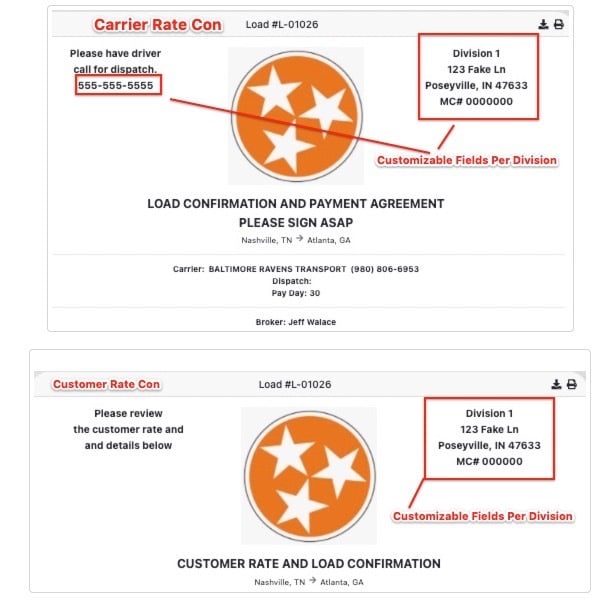
When the EZ Loader support team assists with building out a new Division in your account, they can customize what contact information displays on rate cons sent from users in that division.
Managing User Assignments to Divisions
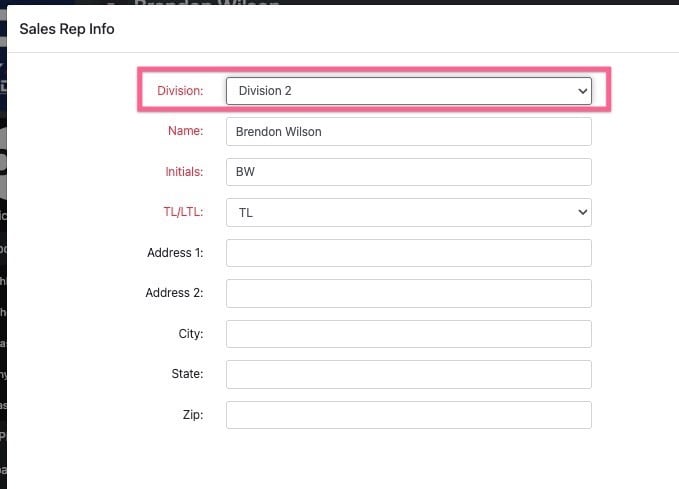
Admin users with access to the Settings > Sales Rep page can switch the division a particular user is in. Select which user you wish to adjust and select the proper value from the divisions drop down.