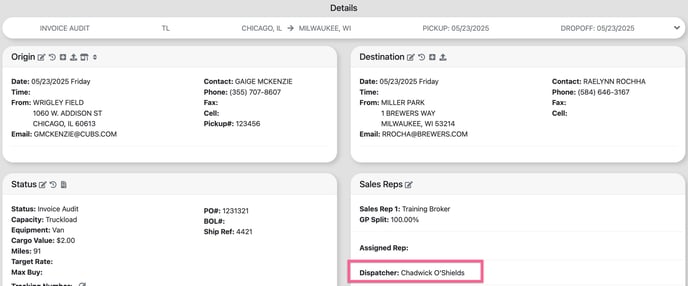
The Dispatch Dashboard displays a number of metrics driven by which user is set as the dispatcher on a load profile. For more information on the the dispatcher role click here.
Note: Only TL mode loads are included in the Dispatcher Dashboard metrics.
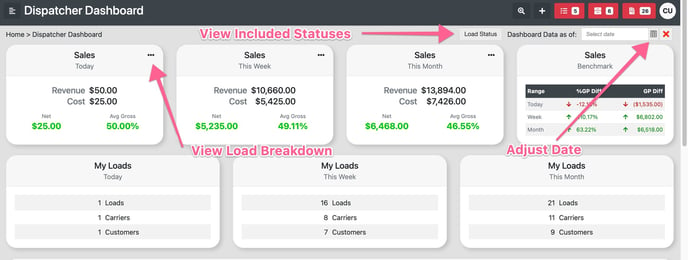
Sales + My Loads Cards
By default, the "Dashboard Data As Of" date is set to the current date. The load status button provides visibility into all load statuses that are factored into the sales card metrics. Additionally, you can expand the range of included statuses by navigating to your settings page and selecting "Company Info and Defaults." Please note that access to this page is restricted to Admin-level users.

The "Today" card includes loads with an origin date equal to the "Dashboard Data As Of" date.
The "Week" range is from Sunday-Saturday around the "Dashboard Data As Of" date and includes loads with an origin date within the range.
The "Month" range is from the beginning to the end of the month around the "Dashboard Data As Of" date and includes loads with an origin date within the range.
My Upcoming Loads
Will display loads with an origin date that is => -14 days from the "Dashboard Data As Of" date and an origin date <= 30 days from the "Dashboard Data As Of" date.
Excludes loads in the following statuses (this exclusion list can not be adjusted):
- Completed, Voided, Customer Paid, Carrier Paid, Invoiced, Delivered, Claims Filed, Received, Invoice Audit, Invoice Pending, Customer Canceled, Leg Approved
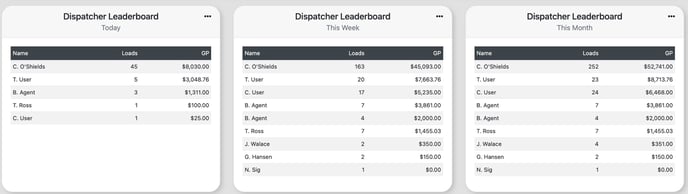
Dispatcher Leaderboard
Includes load counts by user with an origin date within the time period. Included load statuses are the same as what is set for your sales cards and can be reviewed by selecting the "load status" button at the top of the page.
The "Today" card includes loads with an origin date equal to the "Dashboard Data As Of" date.
The "Week" range is from Sunday-Saturday around the "Dashboard Data As Of" date and includes loads with an origin date within the range.
The "Month" range is from the beginning to the end of the month around the "Dashboard Data As Of" date and includes loads with an origin date within the range.
Note: For Multi-Carrier loads if User "A" is the dispatcher on the Master Load and a Leg load it will count as 2 in the leaderboard card.
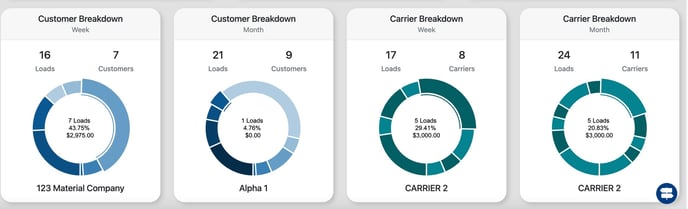
Customer + Carrier Breakdown
Includes load counts by Customer/Carrier with an origin date within the time period. Included load statuses are the same as what is set for your sales cards and can be reviewed by selecting the "load status" button at the top of the page.
The "Today" card includes loads with an origin date equal to the "Dashboard Data As Of" date.
The "Month" range is from the beginning to the end of the month around the "Dashboard Data As Of" date and includes loads with an origin date within the range.